

NCB Diagnosis
Know exactly what's wrong with your WordPress & WooCommerce site — in plain language, with a fix for every finding.
About
NCB Diagnosis: Professional Diagnostics for WordPress and WooCommerce
Every WordPress site owner eventually faces the same frustrating moment: something breaks, and there is no obvious reason why. A checkout stops taking payments, order emails vanish, a page slows to a crawl, or the dashboard turns white after an update. NCB Diagnosis was built for exactly these moments. Instead of leaving you to dig through log files and guess, NCB Diagnosis scans your entire site, tells you in plain language what is wrong, and gives you an actionable fix for every finding — each with a clear severity level and a confidence estimate.
At its core, NCB Diagnosis is designed around one principle: safe, honest diagnostics that anyone can understand. The plugin is read-only by default, which means running a full scan never modifies WordPress or WooCommerce core, never changes your settings, and never silently deactivates a plugin. That makes NCB Diagnosis completely safe to run on a live production store, whether you are a shop owner checking why sales dropped or a developer auditing a client site before handover.
A Complete Picture of Your Site Health
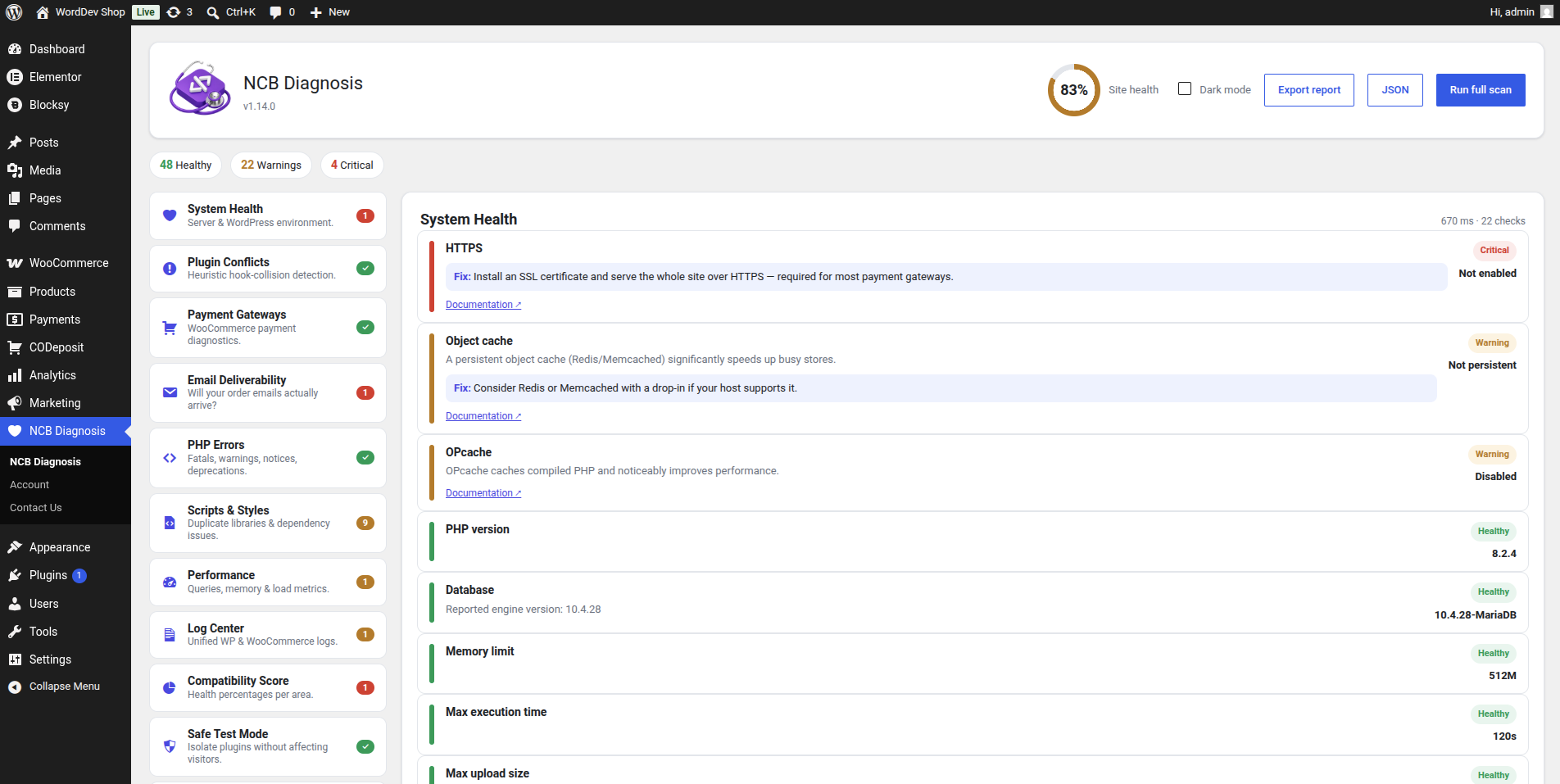
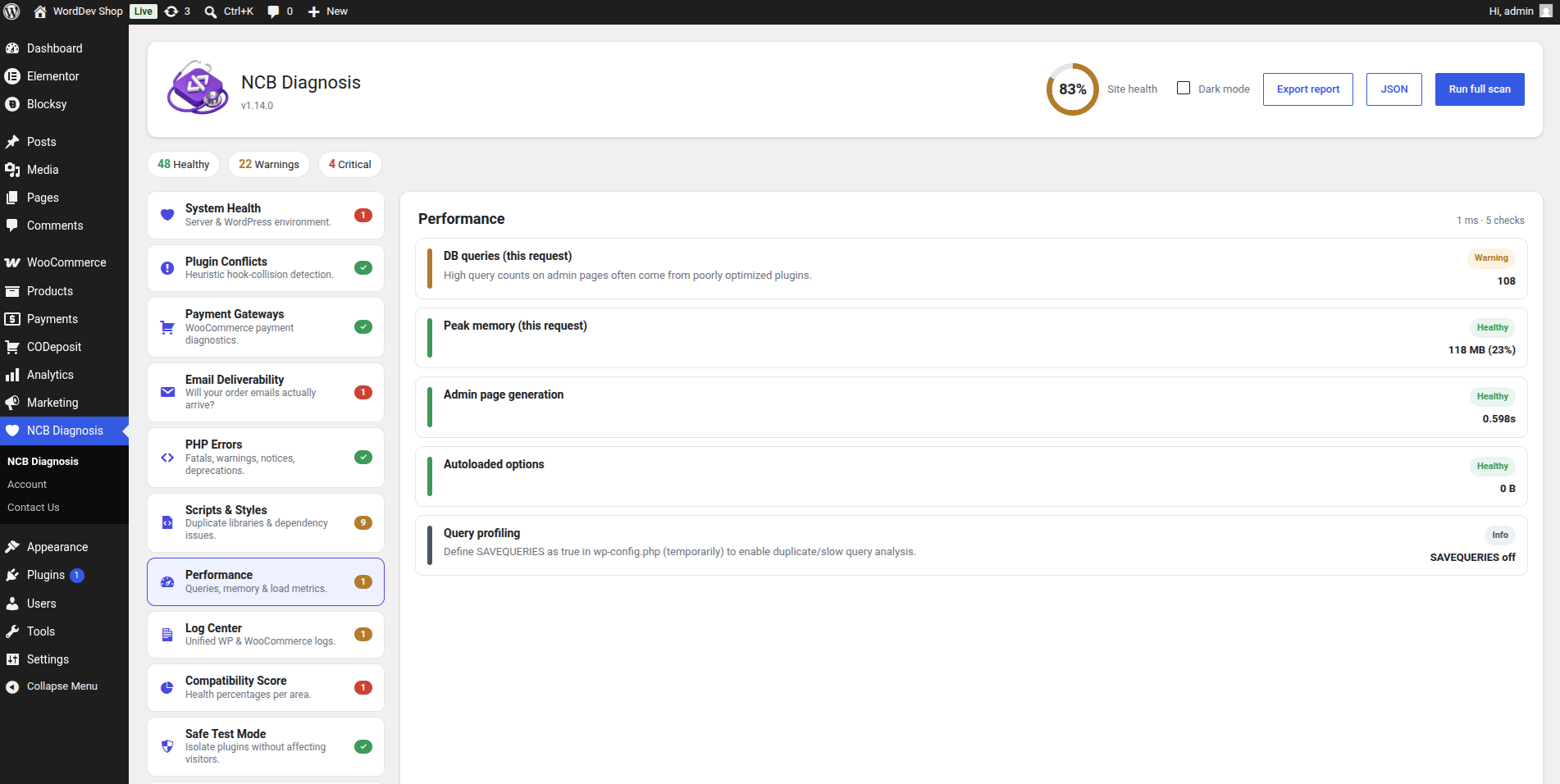
Good troubleshooting starts with visibility, and NCB Diagnosis gives you a complete view of your site health in a single click. Its modular engine works like a team of specialists. System Health inspects PHP, database, memory, cron, HTTPS, caching and writable paths. The PHP Errors module parses your debug log and attributes each fatal, warning or notice to a probable source. Performance surfaces slow and duplicate queries, heavy autoloaded options and load-time issues, while Scripts & Styles catches duplicate libraries and broken dependencies that quietly break your front end. Every result NCB Diagnosis produces is rolled up into per-area percentages and a single overall site-health score, so you always know exactly how your site is doing at a glance.
Built-In Plugin Conflict Detection
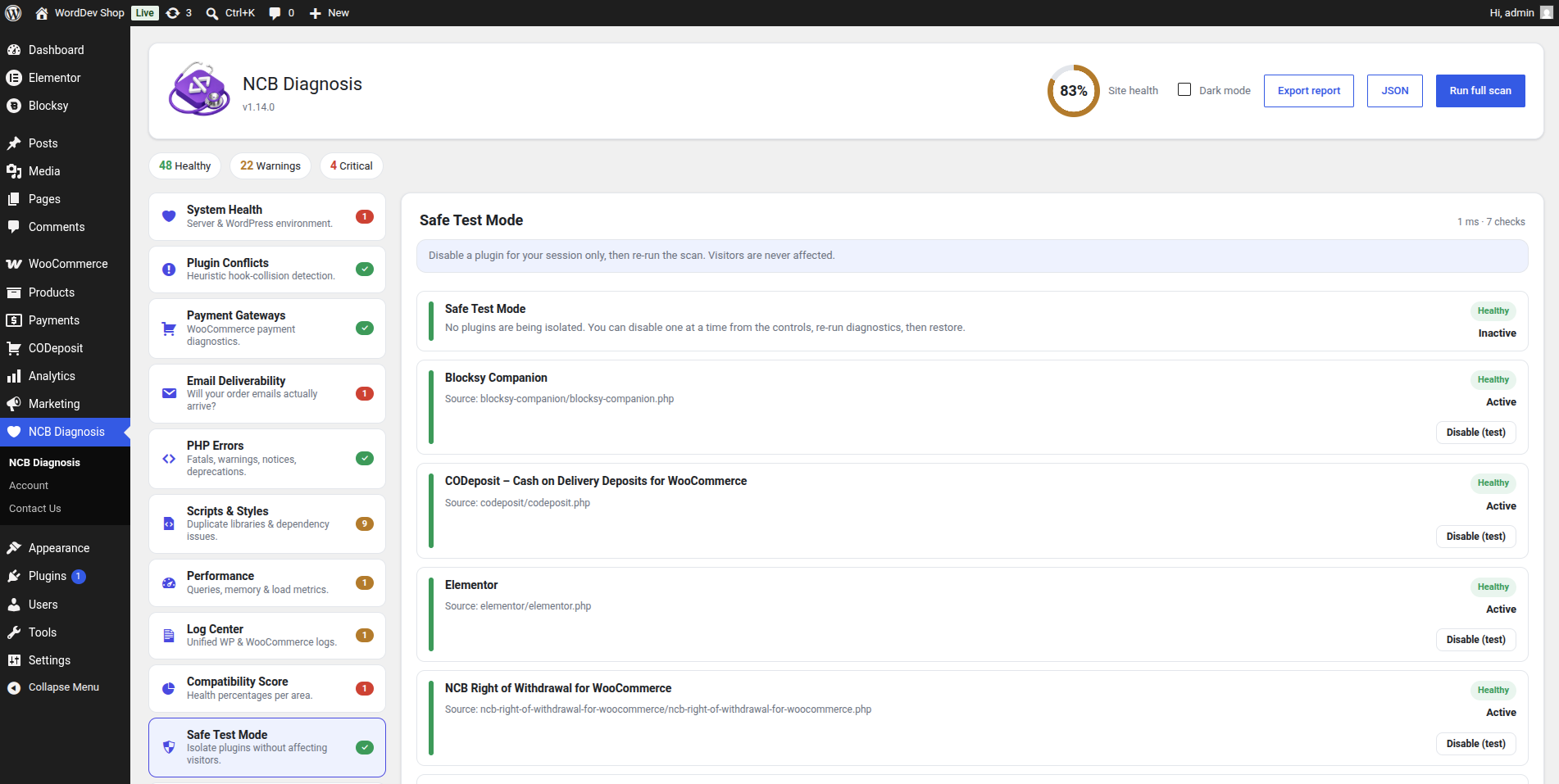
One of the most common causes of a broken WordPress site is two plugins fighting over the same functionality — and finding the culprit manually can take hours. NCB Diagnosis includes intelligent conflict detection that heuristically identifies when multiple plugins hook into the same sensitive actions, including payment hooks, which is the usual cause of silent breakages. When you need to confirm which plugin is responsible, the built-in Safe Test Mode lets you isolate a suspect plugin for your own admin session only. Your visitors and every other user still see the site working normally, nothing is ever permanently deactivated, and the isolation auto-restores after one hour so it can never linger. This is how NCB Diagnosis makes conflict hunting safe and stress-free.
Deep WooCommerce Troubleshooting
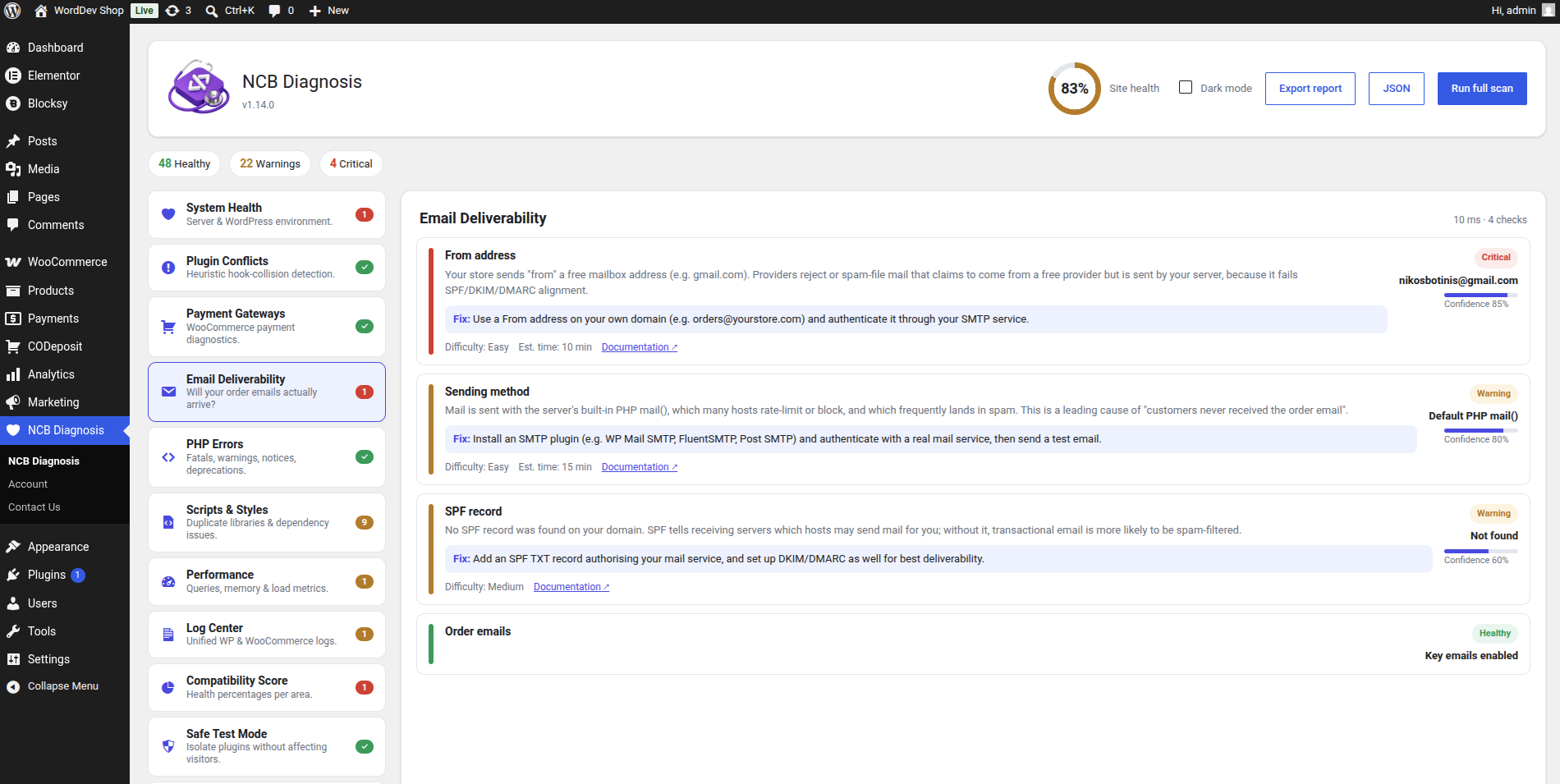
For online stores, downtime means lost revenue, so NCB Diagnosis goes deep on WooCommerce. The Payment Gateways module checks each gateway individually — whether it is enabled, available at checkout, stuck in test mode, or missing API keys. The Checkout Doctor tackles broken checkouts head-on, diagnosing the environment-level causes that silently break or hide checkout: missing SSL, misconfigured cart and checkout pages, block-versus-classic incompatibilities, JavaScript-optimisation conflicts and selling-location restrictions — all wrapped up in a top-line “can customers pay right now?” answer. Additional NCB Diagnosis modules watch Action Scheduler for stalled background tasks, verify that order emails will actually arrive, and check Stock & Orders for negative stock, mismatched statuses and stuck orders, with full HPOS compatibility.
Ongoing Monitoring and Root-Cause Analysis
Diagnostics should not stop the moment you close the dashboard, which is why NCB Diagnosis includes continuous monitoring. With Live Monitor switched on, a lightweight set of critical checks runs automatically on a schedule, a health history is recorded and charted over time, and you receive one email when a problem appears and another when it recovers. The Root-Cause Timeline overlays plugin, theme and core updates onto that health chart, so when trouble starts right after a change, NCB Diagnosis points straight to the likely cause. This turns reactive firefighting into proactive monitoring you can trust.
Professional Tools, Zero Risk
NCB Diagnosis is equally at home for freelancers, agencies and support teams. WP-CLI commands and one-click JSON or human-readable report exports make it perfect for staging checks, CI pipelines and support tickets, while the Guided Fix engine applies selected repairs with a preview, explicit confirmation, an audit log and a full Undo. Requiring WordPress 6.0+ and PHP 8.1+, with WooCommerce entirely optional, NCB Diagnosis is the tool that finally makes WordPress and WooCommerce error diagnosis clear, safe and genuinely actionable.
NCB Diagnosis is developed and maintained by NCB Software.
Overview
NCB Diagnosis is a professional diagnostic and troubleshooting suite for WordPress and WooCommerce. It scans your entire site, explains in plain language what is wrong, and gives you a clear, actionable fix for every finding — each with a severity level and a confidence estimate. It is read-only by default, so it is completely safe to run on a live production store. WooCommerce is optional: the store-specific checks activate automatically when WooCommerce is present, and are skipped cleanly when it isn't.
Who it's for
NCB Diagnosis is built for the people responsible for keeping a site online and a store taking payments:
- Store owners and shop managers who need to know, in plain words, why checkout, emails or stock aren't behaving — without reading code or log files.
- Freelancers and agencies who maintain many client sites and want a fast, consistent way to audit a site, hand over a clean report, and prove the problem was fixed.
- Developers and support teams who want precise, source-attributed findings (with WP-CLI and JSON export) to speed up debugging, CI checks and support tickets.
- Anyone troubleshooting a "something broke after an update" situation, who needs to find the culprit safely — without taking the live site down for visitors.
No technical background is required to read the results, and no risky changes are made unless you explicitly ask for them.
How it works
NCB Diagnosis is built as a set of independent modules — think of them as diagnostic "specialists", each responsible for one area of your site (system health, payments, checkout, email, stock, performance, and more).
1. Run a scan. Press "Run full scan" to check every available area at once, or click a single module in the sidebar to check just that area.
2. Read the findings. Each result appears as a clear card showing: a severity (Healthy, Warning, Critical or Info), a plain-language explanation of what it means, the source it's attributed to (plugin, theme or core), a confidence estimate for heuristic checks, and a suggested fix where relevant.
3. See your score. All findings roll up into per-area percentages and a single overall "Site health" figure in the header, so you know at a glance how healthy the site is.
4. Act safely. Scanning never modifies WordPress or WooCommerce core, never changes settings and never deactivates a plugin. The only features that perform any action — Safe Test Mode and Guided Fix — do so only when you explicitly click, and every change is previewed, reversible and logged.
5. Export or automate. Download a human-readable text report or a machine-readable JSON report for support tickets and audits, or use the built-in WP-CLI commands (wp diagnosis list / run / export) for staging checks and CI.
Screenshots
Pricing
From: 49€/y
Get it now- Version: 1.14.2
- Requires WP: 6.0+
- Requires PHP: 8.1+
FAQ
Does it modify WordPress or WooCommerce core?
No. All diagnostics are read-only by default and core is never modified.
How do I update to a new version?
Upload the new zip and choose "Replace current with uploaded". Your settings are kept.
Does Safe Test Mode disable my plugins permanently?
No. It isolates a plugin only for your own admin session and never permanently disables anything.
Documentation
Full setup and usage guide for this plugin.
Open documentation →