Overview
NCB Diagnosis is a professional diagnostic and troubleshooting suite for WordPress and WooCommerce. It scans your entire site, explains in plain language what is wrong, and gives you a clear, actionable fix for every finding — each with a severity level and a confidence estimate. It is read-only by default, so it is completely safe to run on a live production store. WooCommerce is optional: the store-specific checks activate automatically when WooCommerce is present, and are skipped cleanly when it isn't.
NCB Diagnosis is a professional diagnostic and troubleshooting suite for WordPress and WooCommerce. Instead of leaving you to guess why something broke, it scans your site, tells you in plain language what is wrong, and gives you an actionable fix for every finding — each with a severity level and a confidence estimate. It is read-only by default, which means it is completely safe to run on a live production store.
WooCommerce is optional. When WooCommerce is active, the store-specific checks (payments, checkout, orders, stock) switch on automatically. When it isn't, those checks are skipped cleanly and the general WordPress diagnostics keep working.
── Why site owners choose NCB Diagnosis ──
- Plain-language answers, not raw logs. Every finding explains what it means and what to do about it — no code reading required.
- A fix for every problem. Findings come with a suggested fix, and selected findings offer a one-click, reversible Guided Fix with a preview, confirmation, audit log and Undo.
- Safe by design. Scanning never touches WordPress or WooCommerce core, never changes your settings, and never deactivates a plugin behind your back.
- One clear health score. Per-area percentages and a single overall site-health figure tell you instantly how your site is doing.
- Built for professionals. Source-attributed findings, WP-CLI commands, and JSON / text report export make it ideal for agencies, developers and support teams.
── What it checks ──
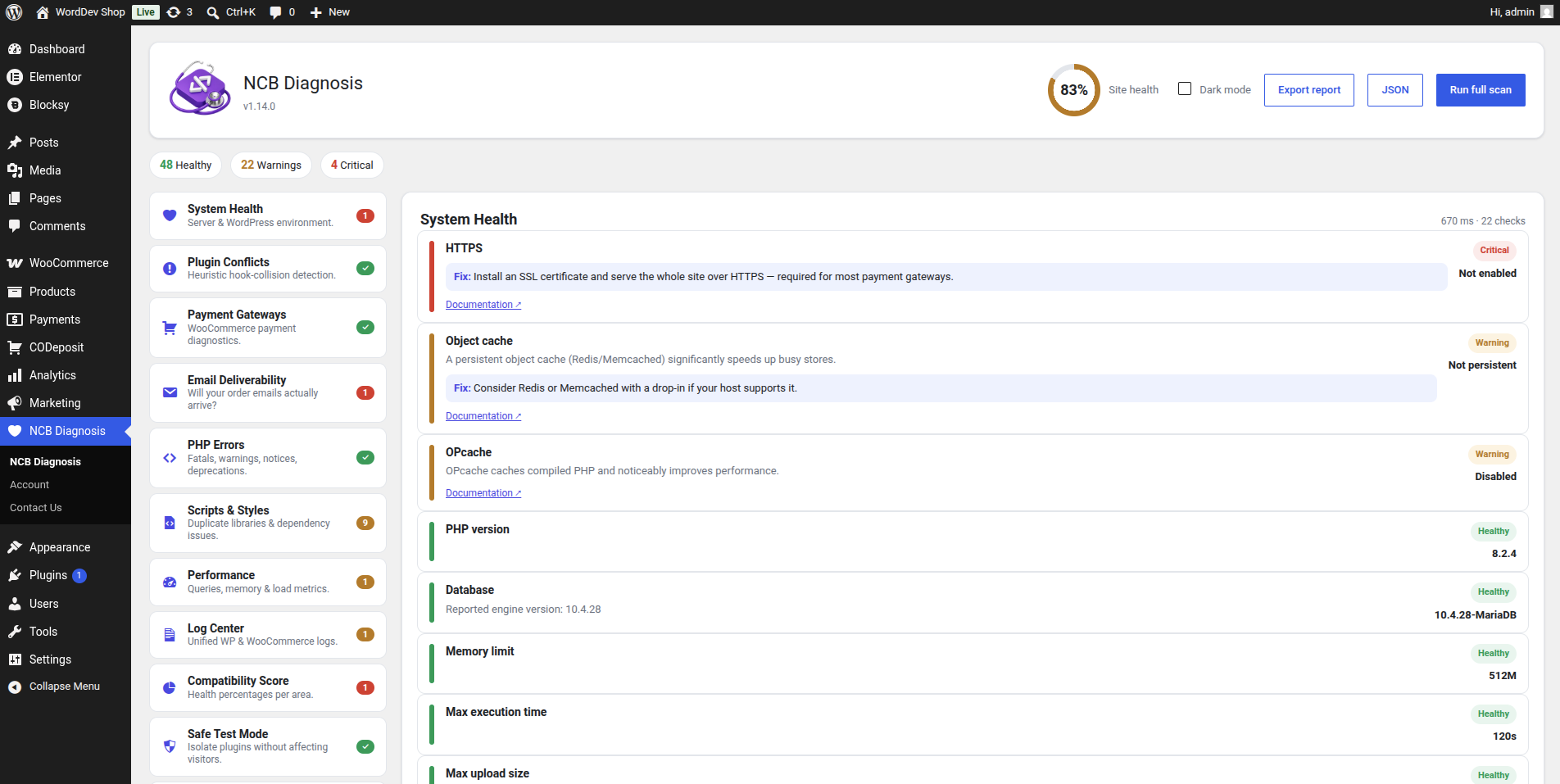
- System Health — PHP, database, memory, extensions, REST API, cron, HTTPS, object cache / OPcache, debug status and writable paths.
- Plugin Conflicts — heuristic detection of multiple plugins hooking the same sensitive actions (including payment hooks) — the usual cause of silent breakages.
- Payment Gateways (WooCommerce) — per-gateway checks: enabled, available at checkout, test/sandbox mode, missing merchant IDs or API keys, and currency/country mismatches.
- Checkout Doctor (WooCommerce) — diagnoses the environment-level causes that silently break or hide checkout: checkout/cart page setup, missing SSL, block-vs-classic compatibility, JavaScript-optimisation conflicts and selling-location restrictions — plus a top-line "can customers pay right now?" answer.
- Action Scheduler (WooCommerce) — surfaces failed background tasks, an overdue/stalled queue and stuck workers behind subscription renewals, order emails and webhooks.
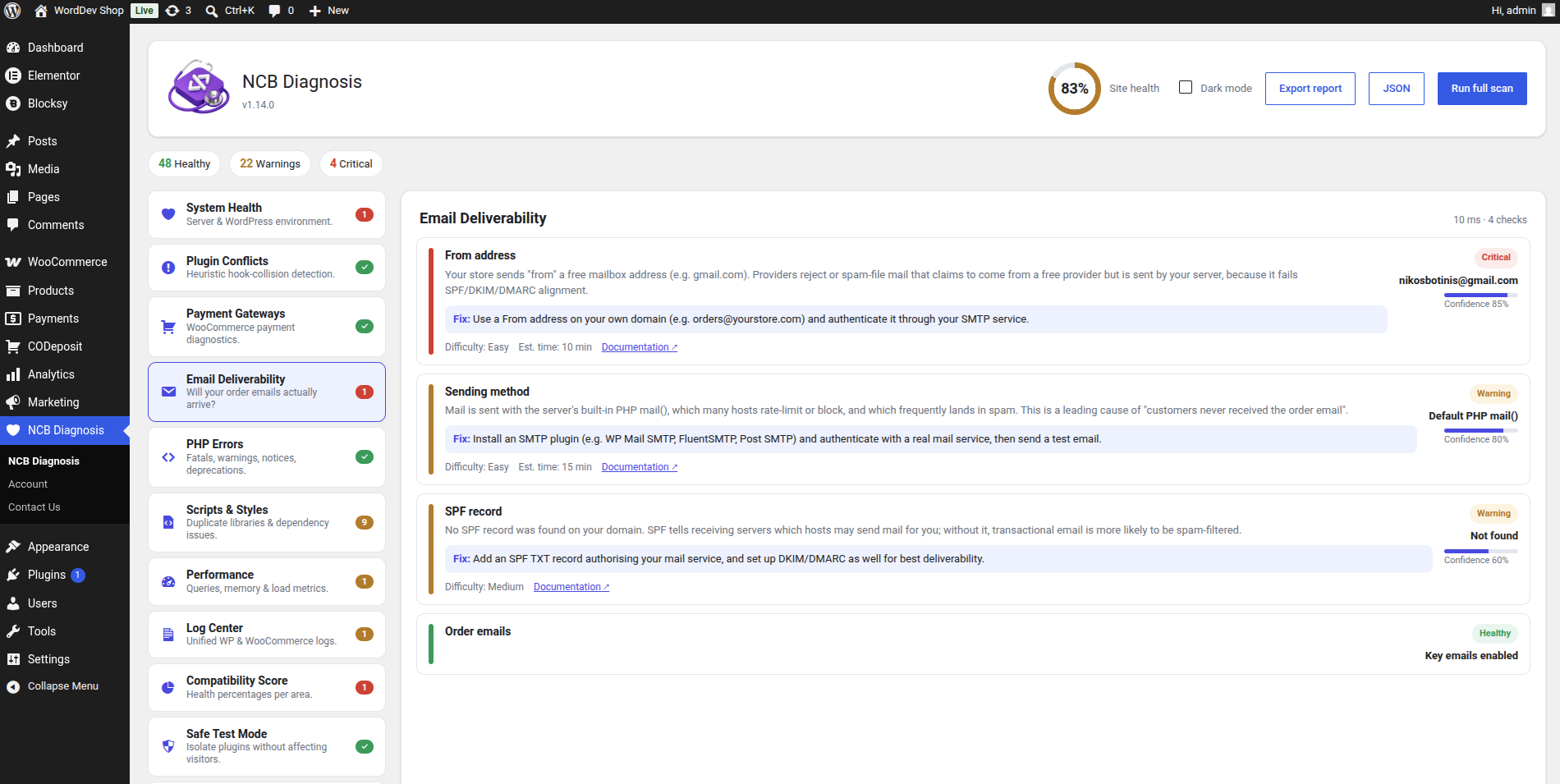
- Email Deliverability — checks whether order and site emails will actually arrive: sending method (raw PHP mail vs SMTP), From-address domain alignment, a best-effort SPF check, and whether key WooCommerce order emails are enabled.
- Stock & Orders (WooCommerce) — catches quiet data problems: negative stock, stock/status mismatches, recent failed orders, and orders stuck in pending/on-hold/processing. HPOS-compatible.
- PHP Errors — parses debug.log, groups fatals/warnings/notices/deprecations and attributes each to a probable source.
- Scripts & Styles — detects duplicate libraries (e.g. multiple jQuery copies) and missing script dependencies that break front-end behaviour.
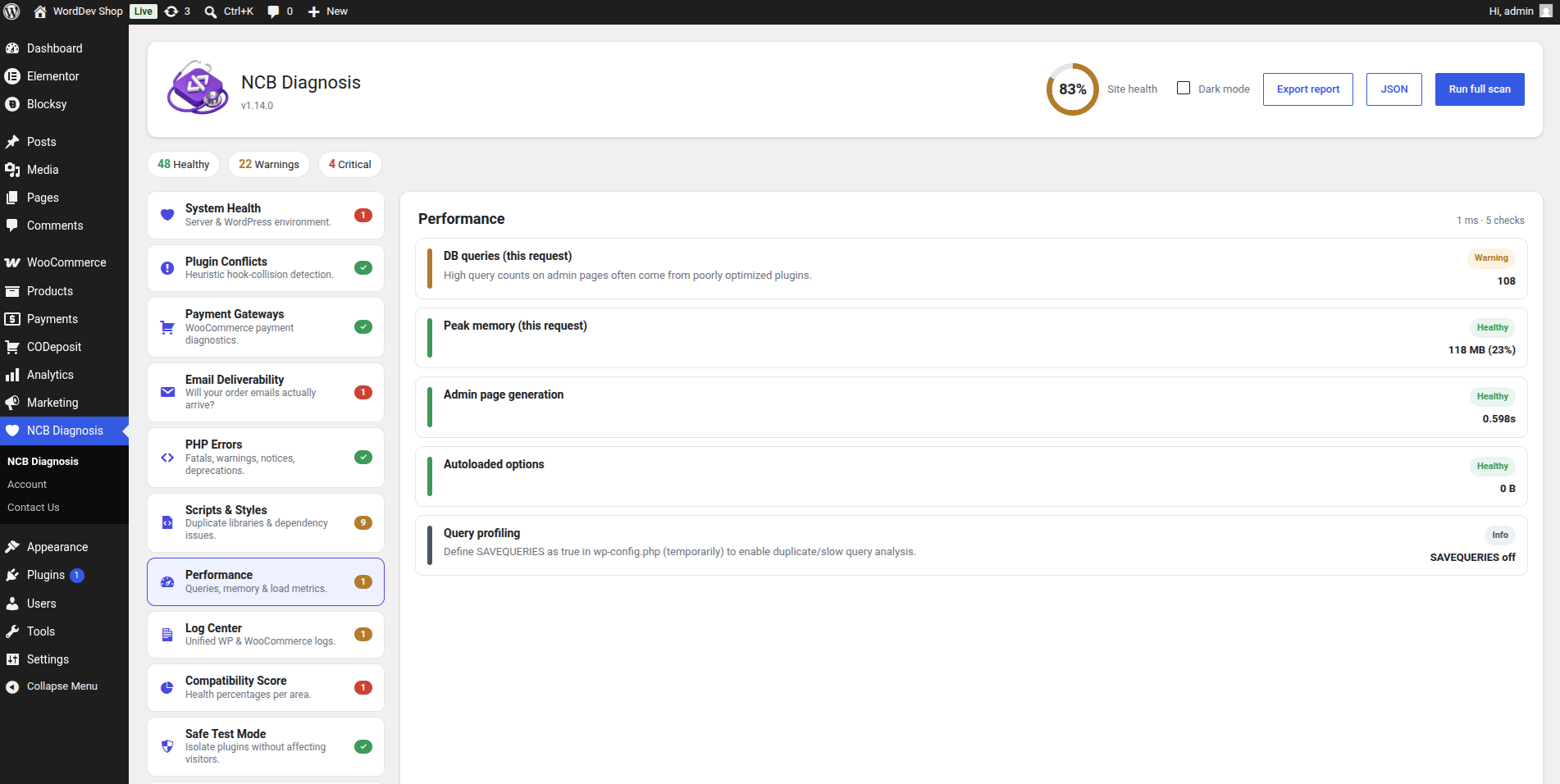
- Performance — query counts, duplicate/slow queries (with SAVEQUERIES), memory usage, load time and bloated autoloaded options.
- Log Center — WordPress and WooCommerce logs together in one place.
- Compatibility Score — per-area percentages plus an overall site-health figure.
── Powerful tools included ──
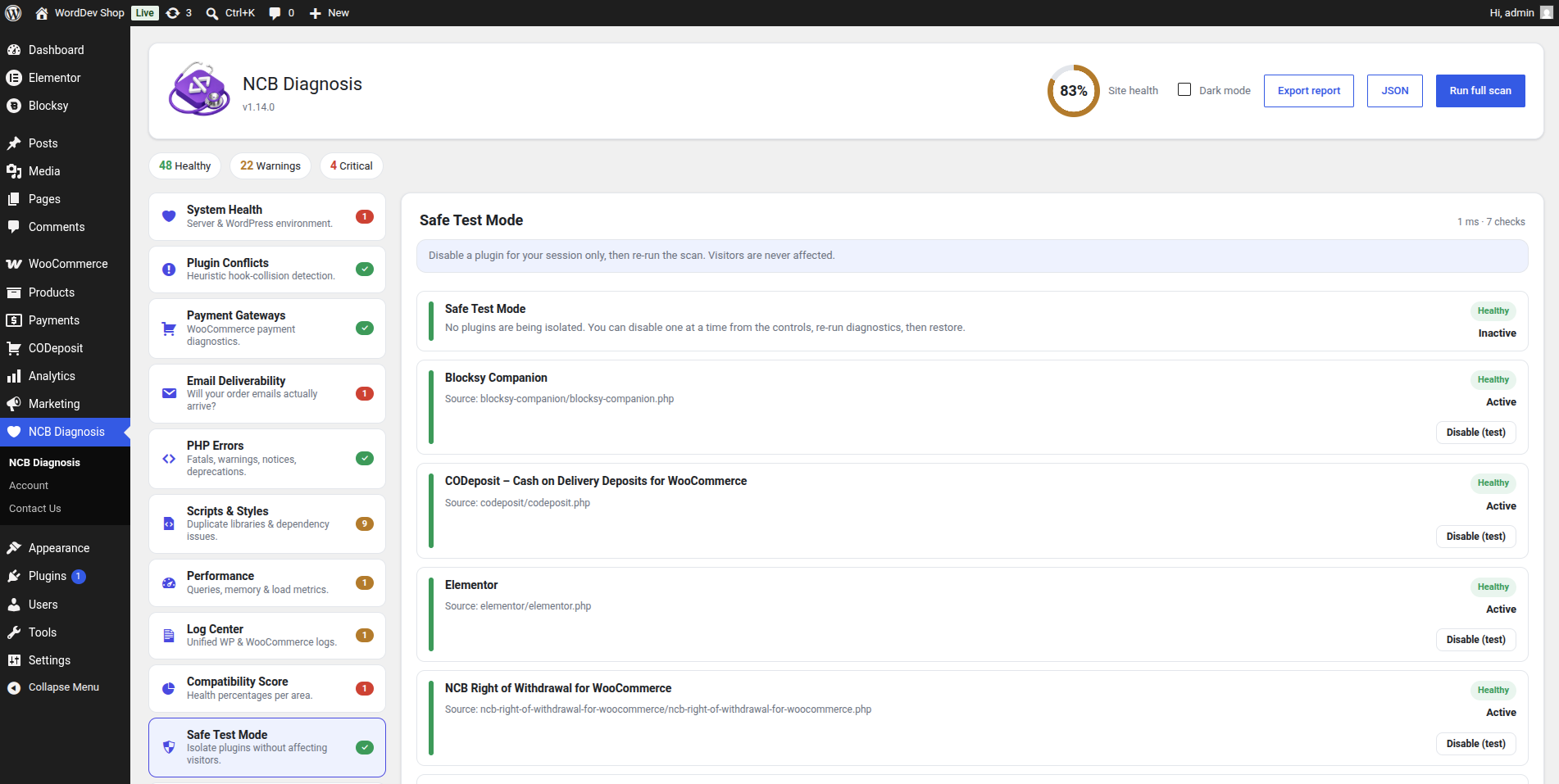
- Safe Test Mode — find which plugin is causing a problem without taking your site down for visitors and without permanently deactivating anything. A suspect plugin is isolated only for your own admin session; every visitor and every other user still sees it active. Isolation auto-restores after one hour so it never lingers.
- Live Monitor — optional continuous background monitoring. A lightweight set of critical checks runs on a schedule (WP-cron or a real server cron), a health history is recorded and charted over time, and you get one email when the site develops a problem and another when it recovers. Retention is configurable.
- Root-Cause Timeline — records plugin/theme/core updates and activations and overlays them on the health chart, then names the likely cause when a problem starts right after a change ("health dropped just after Plugin X updated").
- Guided Fix — selected findings offer a one-click, reversible fix with a preview and explicit confirmation, an audit log and an Undo (for example, re-enabling disabled WooCommerce order emails).
- Developer tools — WP-CLI commands (wp diagnosis list / run / export) and one-click JSON or human-readable text report export for CI, staging checks and support tickets.
── Safety principles ──
- Never modifies WordPress or WooCommerce core.
- Read-only diagnostics by default.
- Any repair action requires explicit administrator confirmation and is fully reversible.
- Confidence percentages on conflict and payment findings are heuristic estimates, not guarantees.
── Requirements ──
- WordPress 6.0 or higher
- PHP 8.1 or higher
- WooCommerce optional (store-specific checks activate automatically when present)
── Updating ──
The plugin folder/slug stays "ncb-diagnosis" across releases, so you can update simply by uploading the new zip and choosing "Replace current with uploaded" (WordPress 5.5+). Your settings are kept and no uninstall is required — any needed migrations run automatically.
NCB Diagnosis is developed and maintained by NCB Software.
Who it's for
NCB Diagnosis is built for the people responsible for keeping a site online and a store taking payments:
- Store owners and shop managers who need to know, in plain words, why checkout, emails or stock aren't behaving — without reading code or log files.
- Freelancers and agencies who maintain many client sites and want a fast, consistent way to audit a site, hand over a clean report, and prove the problem was fixed.
- Developers and support teams who want precise, source-attributed findings (with WP-CLI and JSON export) to speed up debugging, CI checks and support tickets.
- Anyone troubleshooting a "something broke after an update" situation, who needs to find the culprit safely — without taking the live site down for visitors.
No technical background is required to read the results, and no risky changes are made unless you explicitly ask for them.
How it works
NCB Diagnosis is built as a set of independent modules — think of them as diagnostic "specialists", each responsible for one area of your site (system health, payments, checkout, email, stock, performance, and more).
1. Run a scan. Press "Run full scan" to check every available area at once, or click a single module in the sidebar to check just that area.
2. Read the findings. Each result appears as a clear card showing: a severity (Healthy, Warning, Critical or Info), a plain-language explanation of what it means, the source it's attributed to (plugin, theme or core), a confidence estimate for heuristic checks, and a suggested fix where relevant.
3. See your score. All findings roll up into per-area percentages and a single overall "Site health" figure in the header, so you know at a glance how healthy the site is.
4. Act safely. Scanning never modifies WordPress or WooCommerce core, never changes settings and never deactivates a plugin. The only features that perform any action — Safe Test Mode and Guided Fix — do so only when you explicitly click, and every change is previewed, reversible and logged.
5. Export or automate. Download a human-readable text report or a machine-readable JSON report for support tickets and audits, or use the built-in WP-CLI commands (wp diagnosis list / run / export) for staging checks and CI.